MPT-2. Develop Host Agent Deployment + Collection Plan
- All data collection planning artifacts should be saved on the Fileserver SMB Share under
/MISSION/01_PLANNING/02_DATA_COLLECTION_PLAN/for standardization of location and access - Depending on the team's preference, related lists and CSV files can be either saved as individual files or combined as sepearate worksheets in an XLSX workbook
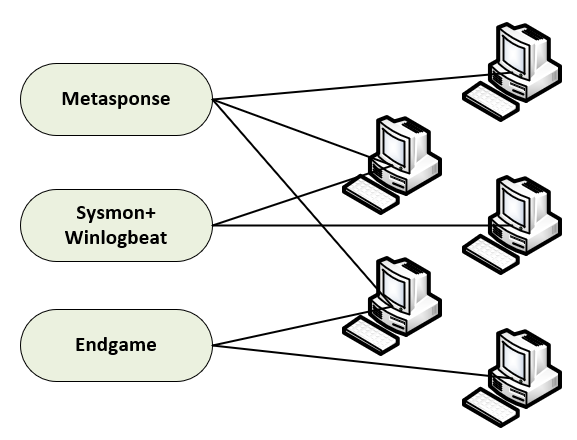
2.1. Gather endpoint targeting info
Identify all targetable mission partner endpoints and their operating systems
Sub-tasks:
- Obtain existing IP/OS asset lists for the mission partner environment for initial targeting
- If no OS information is availabe, plan to use results from baseline network scanning (262COS-NET-SOP-001)
- Obtain PPS (ports, protocols, services) lists for the mission partner environment to identify available remote agent deployment methods
- If no PPS is availabe, plan to use results from remote management port scans (262COS-NET-SOP-001)
| Required Inputs | Expected Outputs |
|---|---|
|
|
target_details.csv | ||||||
|---|---|---|---|---|---|---|
| Hostname | IP Address | Operating System | SSH | WinRM | SMB | WMI/RPC |
| WS-03 | 10.0.0.0/24 (DHCP) | RHEL 8 | ✔ | |||
| WS-01 | 10.0.0.0/24 (DHCP) | Windows 7 SP1 | ✔ | ✔ | ||
| WS-02 | 10.0.0.0/24 (DHCP) | Windows 10 20H2 | ✔ | ✔ | ✔ | |
| SVR-01 | 10.0.0.10 | Windows Server 2012 R2 | ✔ | ✔ | ✔ | |
2.2. Prepare a Host Agent Deployment Plan
Provided is an example/template: Host Agent Deployment Plan.xlsx
Specify the agents that will be deployed to mission partner assets based on compatible operating systems and other limiting factors
Sub-tasks:
- Identify mission tasking/mission partner imposed host agent deployment restrictions
- Coordinate with Mission Partner for whitelisting planned agent installation parameters (filepaths, driver names, service names, etc.) in native security tools (HBSS, Tanium, etc.)
- Refer to the APPENDIX - Endgame OS Compatability table to identify compatible endpoint targets
- Document
Endgamesensor profile installation parameters for obfuscation from MCA (262COS-ENDGAME-SOP-001)
- Document
- Refer to the APPENDIX - Winlogbeat OS Compatability table to identify compatible endpoint targets
- Refer to the APPENDIX - Auditbeat OS Compatability table to identify compatible endpoint targets
- Refer to the APPENDIX - Filebeat OS Compatability table to identify compatible endpoint targets
- Identify specific log file locations and formats required to be collected
- Create per-endpoint
Filebeatconfiguration files to collect the identified log file-based Data Components
- Identify the method(s) in which each agent will be deployed (Deploy-Agent script, TFPlenum, or manually)
- Identify the method(s) in which each agent will be removed at the end of the mission (include specific commands/instructions for agents that will be removed manually)
| Required Inputs | Expected Outputs |
|---|---|
|
|
agent_targets.csv | |||||||||
|---|---|---|---|---|---|---|---|---|---|
| DEPLOYMENT GROUP | HOSTNAME | DOMAIN | MANAGEMENT IP | OPERATING SYSTEM | SYSMON | ENDGAME | WINLOGBEAT | AUDITBEAT | FILEBEAT |
| 1 | DC | FAKENET.USAF.MIL | 150.151.9.250 | Windows | ✔ | ✔ | ✔ | ||
| 1 | FILE | FAKENET.USAF.MIL | 150.151.9.252 | Windows | ✔ | ✔ | ✔ | ||
| 1 | WEB | FAKENET.USAF.MIL | 150.151.55.253 | UNKNOWN | ? | ? | ? | ? | CONFIG |
| 1 | EXCHANGE | FAKENET.USAF.MIL | 150.151.55.251 | Windows | ✔ | ✔ | ✔ | ||
| 2 | RF-C2B-6-1 | FAKENET.USAF.MIL | 150.151.6.1 | Windows | ✔ | ✔ | ✔ | ||
| 2 | RF-C2B-6-2 | FAKENET.USAF.MIL | 150.151.6.2 | Windows | ✔ | ✔ | ✔ | ||
| 2 | RF-C2B-6-3 | FAKENET.USAF.MIL | 150.151.6.3 | Windows | ✔ | ✔ | ✔ | ||
| 2 | RF-C2B-6-4 | FAKENET.USAF.MIL | 150.151.6.4 | Windows | ✔ | ✔ | ✔ | ||
| 2 | RF-C2B-6-5 | FAKENET.USAF.MIL | 150.151.6.5 | Windows | ✔ | ✔ | ✔ | ||
Any custom configuration files should also be saved with filenames that include the intended target's hostname (ex: <HOSTNAME>-filebeat.yml) to avoid confusion during deployment.
Apache module filebeat.yml config example:
filebeat.modules:
- module: apache
  access:
    enabled: true
    var.paths: ["/path/to/log/apache/access.log*"]
  error:
    enabled: true
    var.paths: ["/path/to/log/apache/error.log*"]
2.3. Prepare a Metasponse Collection Plan
Provided is an example/template: Metasponse Collection Plan.xlsx
Specify active collection Metasponse jobs to collect data sources that will not be streamed by host agents
Sub-tasks:
- Coordinate with Mission Partner for whitelisting planned Metasponse job execution folder in native security tools (HBSS, Tanium, etc.)
- Batch together
Metasponsejobs into pre-configured templates (262COS-MS-SOP-002) for quick deployment - Batch together targets into like-groups broken into reasonable sizes (~10), in order to not execute on too many targets in parrallel
| Required Inputs | Expected Outputs |
|---|---|
|
|
metasponse_targets.csv | ||||
|---|---|---|---|---|
| DEPLOYMENT GROUP | HOSTNAME | DOMAIN | MANAGEMENT IP | OPERATING SYSTEM |
| 1 | DC | FAKENET.USAF.MIL | 150.151.9.250 | Windows |
| 1 | FILE | FAKENET.USAF.MIL | 150.151.9.252 | Windows |
| 1 | WEB | FAKENET.USAF.MIL | 150.151.55.253 | UNKNOWN |
| 1 | EXCHANGE | FAKENET.USAF.MIL | 150.151.55.251 | Windows |
| 2 | RF-C2B-6-1 | FAKENET.USAF.MIL | 150.151.6.1 | Windows |
| 2 | RF-C2B-6-2 | FAKENET.USAF.MIL | 150.151.6.2 | Windows |
| 2 | RF-C2B-6-3 | FAKENET.USAF.MIL | 150.151.6.3 | Windows |
| 2 | RF-C2B-6-4 | FAKENET.USAF.MIL | 150.151.6.4 | Windows |
| 3 | C2B-Fedora-01 | 150.151.6.51 | Fedora | |
metasponse_job_schedule.csv | |||
|---|---|---|---|
| EXECUTION ORDER | JOB TEMPLATE / PLUGINS | DEPLOYMENT GROUP | JOB TITLE |
| 0 | DISCOVERY | ALL | INITIAL-DISCOVERY |
| 1 | 262 - [🔥Volatile Info] ARP Cache (Win/Linux) | 1 | VOLTAILE_INFO-DG1-1/3 |
| 1 | VOLATILE_INFO | 2 | VOLTAILE_INFO-DG2-1 |
| 1 | VOLATILE_INFO | 3 | VOLTAILE_INFO-DG3-1 |
| 2 | 262 - [🔥Volatile Info] Processes (Win/Linux) | 1 | VOLTAILE_INFO-DG1-2/3 |
| 2 | SYSTEM_CONFIG | 2 | SYSTEM_CONFIG-DG2-1 |
| 2 | SYSTEM_CONFIG | 3 | SYSTEM_CONFIG-DG3-1 |
| 3 | 262 - [🔥Volatile Info] Netstat (Win/Linux) | 1 | VOLTAILE_INFO-DG1-3/3 |
| 3 | PERSISTENCE | 2 | PERSISTENCE-DG2-1 |
| 3 | PERSISTENCE | 3 | PERSISTENCE-DG3-1 |
| 4 | SYSTEM_CONFIG | 1 | SYSTEM_CONFIG-DG1-1 |
| 5 | PERSISTENCE | 1 | PERSISTENCE-DG1-1 |
2.4. Prepare a Syslog configuration plan
Specify mission partner assets that need to be configured to natively stream Syslog to CVA/H
| Required Inputs | Expected Outputs |
|---|---|
|
|
Any custom configuration commands should be saved as files with filenames that include the intended target's hostname (ex: <HOSTNAME>-ios-commands.txt) to avoid confusion during deployment.
Below are RFC3164 Syslog example [configurations](/01_PRE-EXECUTION/AID-002%20-%20Host%20Data%20Collection Planning/12_cvah_capability_considerations#syslog-considerations) for forwarding to CVA/H (specific commands and configurations may vary based on your environment):
-
Rsyslog (
rsyslog.conf):*.* @@<DIP_EXT_IP>:5047-- OR --
*.* action(type="omfwd" target="<DIP_EXT_IP>" port="5047" protocol="tcp" action.resumeRetryCount="100" queue.type="linkedList" queue.size="10000") -
Syslog-NG (
syslog-ng.conf):destination d_cvah { network("<DIP_EXT_IP>" transport("tcp") port(5047)); };
log { source(s_sys); destination(d_cvah); }; -
Cisco IOS:
switch> enable
switch# configure terminal
switch(config)# logging <DIP_EXT_IP> transport tcp port 5047
switch(config)# logging on
switch(config)# end
switch# show logging
switch# write memory -
Junos OS:
user@device> configure
user@device# set system syslog host <DIP_EXT_IP> any informational
user@device# set system syslog host <DIP_EXT_IP> transport tcp port 5047
user@device# show system syslog
user@device# commit